软件简介:
RetroBar 能将你现代 Windows 系统的任务栏替换为经典的 Windows 95、98、Me、2000、XP 或 Vista 样式,带你 “穿越” 回过去。
RetroBar 基于 ManagedShell 库开发,具备出色的兼容性与性能。
下载地址:
夸克盘:https://pan.quark.cn/s/ac99413f7d53
迅雷盘:https://pan.xunlei.com/s/VOzyH96gtS0g1irp-FUQPnXjA1?pwd=hp3s#
百度盘:https://pan.baidu.com/s/1GnXQ_tTAmp-1r4E060mJbg?pwd=8p8h
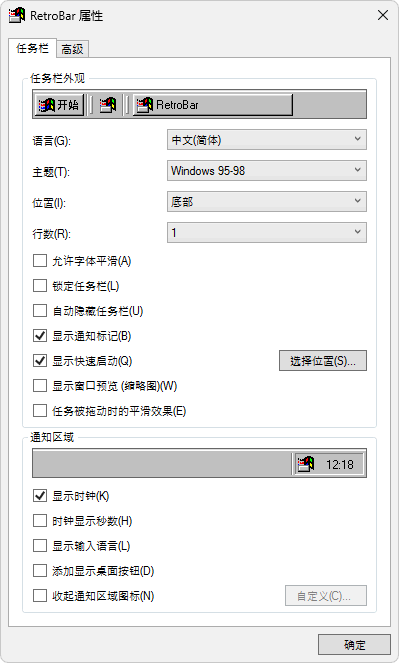
软件截图:

系统要求:
Windows 7 SP1、Windows 8.1、Windows 10 或 Windows 11
.NET 6.0.2 或更高版本的桌面运行时(请在 “Run desktop apps”(运行桌面应用)下方选择对应的下载按钮)
若使用 RetroBar 安装程序,必要时会自动下载并安装上述运行时。
功能特点:
将默认 Windows 任务栏替换为经典布局
原生通知区域,支持气泡通知
原生任务列表,支持 UWP 应用且可拖拽重新排序
快速启动工具栏
开始按钮可打开现代开始菜单
可显示或隐藏时钟
任务栏可自动隐藏
支持任务栏锁定与解锁两种显示状态
可在屏幕任意一侧显示任务栏(即使是 Windows 11 系统)
任务栏可调整大小,且支持多行列显示
可选择在多显示器上显示任务栏、通知区域及时钟
支持显示 Vista 风格的窗口缩略图
可自定义 XP 风格的可折叠通知区域
支持自定义主题
包含主题:
System (Classic, XP, and Vista)
Watercolor
Windows 95-98
Windows Me
Windows 2000
Windows XP:
Classic
Blue
Olive Green
Silver
Royale
Royale Noir
Embedded Style
Zune Style
Windows Longhorn Aero
Windows Vista:
Aero
Basic
Classic
软件开源地址: https://github.com/dremin/RetroBar
更多主题下载: https://www.deviantart.com/tag/retrobar